It’s the first ever IO Dock outside Alesis’ labs to feature a USB hub, it’s the most successful project in this blog, and I am selling it. 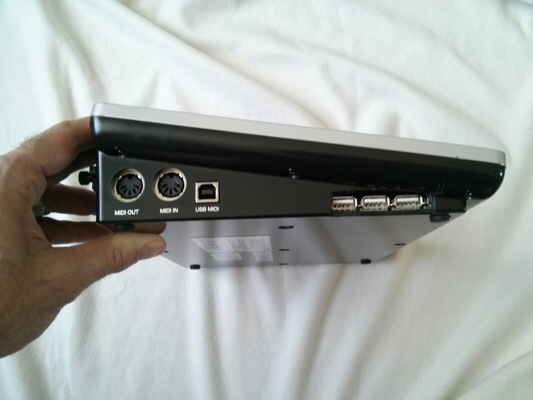
It was a simple hack on a crazy notion, and I’m really happy how it all turned out, getting noted by Discchord and Synthopia and others. More importantly, it’s a simple solution for a real problem, and it just works.
I’m also a lot more confident that it’s a good hack: The modified IO Dock has been in use at home and in the band for over a year, and the hack has been successfully replicated by some very smart hackers – over at Churchnerd’s blog you’ll not only find a description how to do it that is way better than mine, he also found a simple and elegant way to make the modded dock work with the iPad Air.
So why am I selling? I’ve got a good reason: Money. :) Apart from that, I am using an iPad Air now and switched over to another interface – a third-hand Novation X-Station keyboard/synth/fx combi with class-compliant USB Midi and Audio in/out. Best solution in the practice room for the time being, and if I’m getting a good price on my IO Dock, I might go out and get a Focusrite iTrack Dock to use at home.
However, I encourage you to try the hack for yourself, and I am confident that it will work with the new, lightning connector enabled, IO Dock 2. (Update: unfortunately, it doesn’t.)
A couple of things I have learned:
- Some people are really scared by the bullshit warnings that advise you not to open the housing.
- Anybody who can solder a cable can do it.
- The hub matters. I was lucky to pick an active hub that works in my setup, a Belkin F5U404. If the hack does not work, and you have excluded switched in/out ports and messed-up USB connections as the cause, you may try another powered hub.
- Use connectors, don’t solder it into the IO Dock – although you need 2mm pinstripe plugs/sockets like these that may be a bit hard to find, it is worth the effort: you’ll be able to test and reverse the hack.
- Lab-test first. Dremel later. Before soldering or dremeling anything in the Dock, start with a simple workbench test – open the Dock, unplug the connector for the iPad, connect it to the hub with the modified cables you’ve made.
- If you overload the IO Dock by drawing too much USB current, it just shuts down. So far, no harm has been done, still I think it’s a good idea to be careful and never connect more than one 500mA device.
- When you are hacking the IO Dock anyway, you might think about adding a power-on LED connected to the hub’s 5V supply – I always regretted not having done this.
One thing left to do: Many, many thanks for all the feedback, the ideas and the improvement. It made it all worth while. Whatever the turnout of my auction is.
Hello,
Thank you for posting this fascinating hack.
I, like you, am trying to connect a USB MIDI keyboard with a USB A-type connector to the io Dock. I am wondering if there is any other way to accomplish this beyond your excellent modification. In particular: can you connect the keyboard to a PC, and the PC to the io Dock via a USB to MIDI cable? My io Dock sits next to my PC normally so that is not a problem.
http://goo.gl/So5TSI
I appreciate any advice you might have. The project looks fun, but I don’t have time at the moment to complete it.
Best,
Michael
That should work. Some software on the PC working as a MIDI bridge required, though Have you considered selling the IO Dock and getting the Focusrite iTrack Dock?
Pingback: URL